
How to Track AI Overviews for Your Site

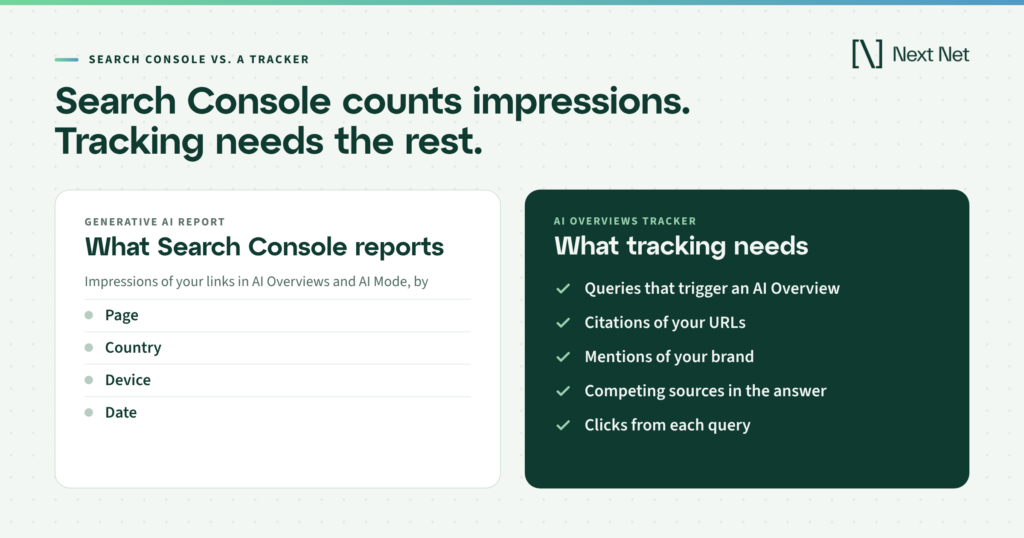
Open Search Console today and you can finally see a number for Google AI Overviews. The generative AI performance report tells you how many times links to your site appeared in Google’s AI answers, broken out by page, country, device, and date.
What it won’t tell you is which question triggered the answer, whether your page was the source the answer leaned on or one link among eight, whether your brand was named in the text, or who else Google put in the same response. Those are the four things that decide whether an AI Overview is helping you or quietly replacing you.
This post shows you how to track AI Overviews for your site properly. You’ll get a working definition, a clear map of what Google’s own data covers, a query set you can build this week, a manual tracking method you can run in a spreadsheet, and the criteria to use when you outgrow the spreadsheet and need an AI Overviews tracker.
What AI Overviews tracking means
AI Overviews tracking is the practice of monitoring a fixed set of search queries on a regular schedule and recording four things for each one: whether Google shows an AI Overview, whether your pages are linked inside it, whether your brand is named in its text, and which other sources share the answer. An AI Overviews tracker is any tool or process that records those four things over time, so you can spot changes, explain them, and tie them back to traffic.
Two parts of that definition matter more than they look.
It’s query-level. An AI Overview is a response to a specific search. A site-wide impression total can rise while you lose the three queries that drive your leads. Tracking has to start from the queries you care about.
It’s repeated. AI Overviews change as Google’s models update, as competitors publish, and as the sources Google trusts shift. One check is a snapshot. The value comes from the second, third, and tenth sample on the same queries.
What Search Console shows you now, and what it leaves out
Google rolled the generative AI performance report out to every site worldwide on August 31, 2026, after a phased start in June. According to Google’s help documentation for the generative AI performance report, it counts impressions of your links inside AI Overviews and AI Mode, and lets you group them by page, country, device, and date. It also lets you filter between text searches and multimodal searches, such as Google Lens and Circle to Search.
That’s a real step forward, and you should open it before you do anything else. Our AI visibility explainer walks through the report screen by screen, so this post won’t repeat that tour. For tracking purposes, the gaps are what matter:
- No queries. You can see which pages earned AI impressions but not which searches produced them.
- No clicks or click-through rate. Impressions only.
- AI Overviews and AI Mode are combined. The two features use different models and show different links, but the report counts them together.
- No mention data. It records links to your site and stops there, with nothing on whether your brand was named in the answer text.
- No competitor view. It can’t show you who else was in the response.
The position trap in the classic Performance report
AI Overview clicks and impressions have always been counted inside the “Web” search type of the standard Performance report. That creates a quirk worth knowing before you read any trend line.
Google’s documentation on how impressions, position, and clicks are counted says an AI Overview occupies a single position on the results page, and every link inside it is assigned that same position. It also says the position Search Console records for a query is the topmost position any of your links held.
Put those together and you get a common surprise. If your page ranks eighth organically but is linked inside an AI Overview at the top of the page, Search Console can record your position for that query as 1. Your average position improves, your clicks don’t, and the report looks better than the traffic feels. When a page’s average position jumps without a matching rise in clicks, check whether it started appearing inside an AI Overview.
The four things an AI Overviews tracker has to record
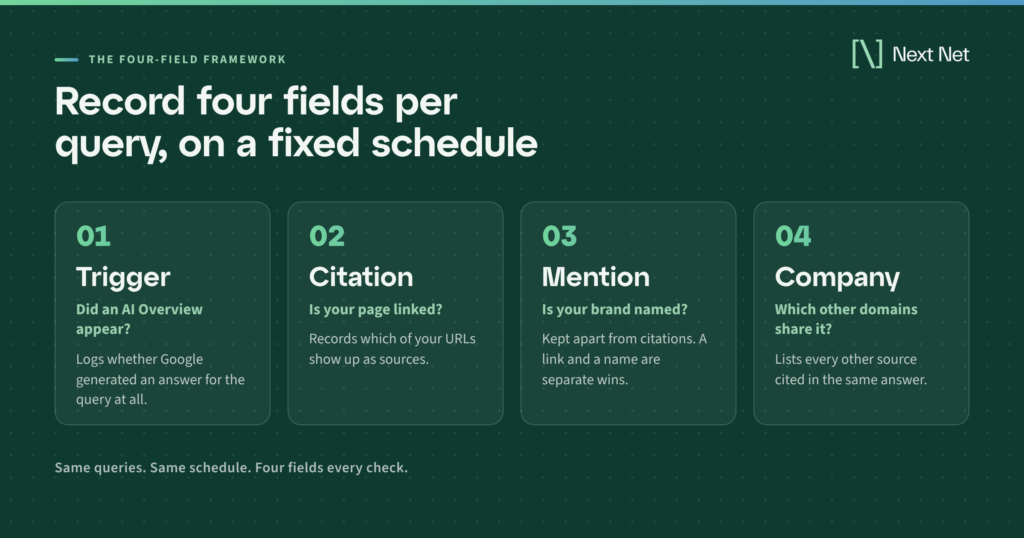
Every tracking method, from a spreadsheet to a platform, should capture the same four fields for each query on each check.
1. Trigger: does an AI Overview appear at all?
Google’s guide to AI features and your website says AI Overviews show only when Google’s systems judge them additive to classic results, and that they often don’t trigger. That makes the trigger rate the first number to track. When a query stops producing an AI Overview, you’re looking at a different results page, and it calls for a different response than losing a citation would.
Query shape changes the odds a lot. In Pew Research Center’s analysis of real Google browsing data, 18% of all searches in March 2025 produced an AI summary. Searches that opened with question words like who, what, when, or why produced one 60% of the time, and searches of 10 words or more produced one 53% of the time. One- and two-word searches produced one just 8% of the time. If your tracked queries are all short head terms, you’ll undercount the answers your buyers see.
2. Citation: is one of your pages linked?
Record yes or no, and record which URL. The URL matters as much as the yes. Google often links a page you wouldn’t have picked, such as an old blog post instead of the service page you built for that query. Over time the citation log tells you which of your pages Google trusts for which topics.
3. Mention: is your brand named in the answer text?
A link and a mention are different signals. An AI Overview can cite your page as a source while naming a competitor in the answer, or name your brand without linking to you at all. Log them separately. The citation footprint post covers why the gap between linked and named matters across every engine, Google included.
4. Company: who else shares the answer?
List every domain linked in the AI Overview. This is the field most teams skip and the one that pays off fastest, because the same handful of publishers, directories, and forums tend to show up again and again in a category. Those repeat sources are where Google is learning about your market. The AI citation sources post explains how to turn that list into a reference-building plan.
A citation tucked at the end of a long source list, beside six names a reader recognizes first, is the citation version of scenery: technically present, and passed over on the way to someone else. The company field is how you tell the difference between being in an answer and being chosen by it.
Build your query set before you pick a tool
The most common tracking mistake happens before any tool is involved: a weak query list. A tracker pointed at the wrong queries produces clean, confident, useless numbers.
Start from Search Console. The generative AI report tells you which pages earn AI impressions. Take those pages into the standard Performance report, filter by page, and pull the queries each one ranks for. The question-shaped and longer queries in that list are your strongest candidates, since they’re the ones most likely to trigger an AI Overview.
Add the questions your buyers ask. Pull phrasing from sales calls, support tickets, onsite search, and the “People also ask” boxes on your core terms. Write them the way a person types them, with the qualifiers left in: location, budget, use case, and the comparison they’re already making.
Group by topic, not by keyword. Tracking 150 queries as a flat list makes every change look random. Grouping them into eight or ten topics shows you where you’re gaining ground and where you’re losing it. The AI topical map post shows one way to organize them.
Tag each query. At minimum, tag the topic, the funnel stage, and the page you’d want Google to cite. That last tag turns every check into a test: did Google link the page you built for this question, or a different one?
Size it to your method. Fifty queries is a workable manual set. A few hundred needs automation. Either way, keep the list stable once you start, and add new queries in batches you can label, so a jump in your numbers reflects Google and your list stays out of the explanation.
How to track AI Overviews manually
You can run a credible first version in a spreadsheet. It won’t scale, but it will teach you what to look for, and it’ll give you a baseline before you spend money on anything.
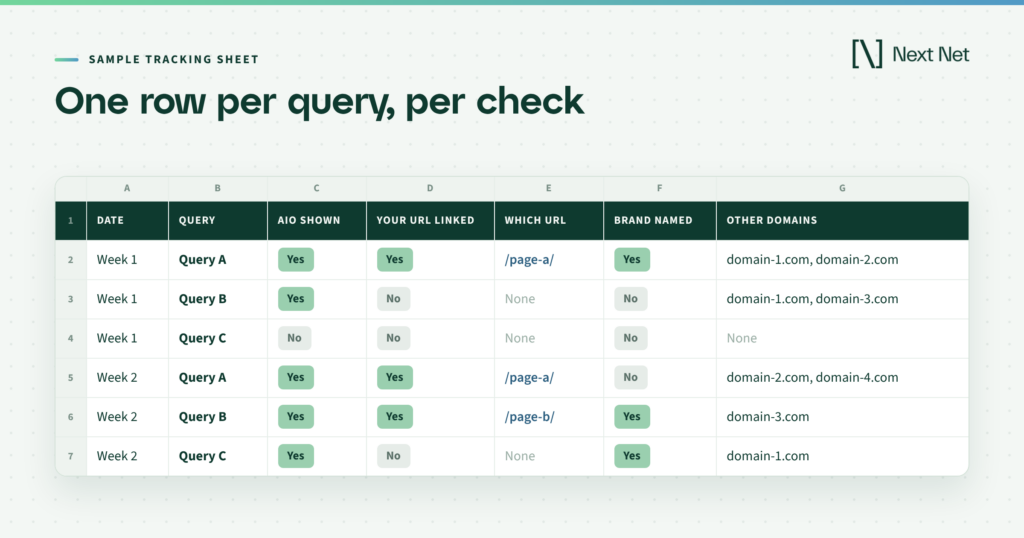
- Set up the sheet. One row per query per check, with columns for date, query, topic, AI Overview shown (yes or no), your URL linked (yes or no), which URL, brand named in text (yes or no), other domains linked, and notes.
- Control the conditions. AI Overviews vary by location, device, and signed-in state. Run every check from the same location, on the same device type, in a private window, signed out. Write the conditions at the top of the sheet so whoever runs next month’s check matches them.
- Run the queries. Search each one, expand the AI Overview if it’s collapsed, and fill in the row. Take a screenshot of every AI Overview that links you or a direct competitor.
- Tally by topic. For each topic, calculate the share of queries that triggered an AI Overview, the share of those that linked you, and the share that named you. Those three ratios are your first dashboard.
- Repeat on a fixed schedule. Weekly is ideal for your most important topics. Every two weeks is fine for the rest. Change nothing about the method between checks.
- Note what you changed on the site. Every time you publish, rewrite, or restructure a page in a tracked topic, log the date. That’s what lets you connect a movement in the numbers to something you did.
A manual check has limits you should be upfront about with your team. It’s a sample of one location and one moment, it’s slow, and personalization means a colleague may see a different answer. Treat it as a directional read.
Connect AI Overviews tracking to traffic
Visibility numbers matter for what they do to the business, so the next step is tying them to clicks and conversions.
Know what a click from an AI Overview is worth. Pew’s same analysis found that people who saw an AI summary clicked a traditional result on 8% of visits, against 15% when no summary appeared, and clicked a link inside the summary itself on about 1% of visits. Assume AI Overviews will reduce click-through on the queries where they appear, and plan your reporting around that rather than being surprised by it.
Split your queries by AI Overview status. Use your tracking sheet to label which queries trigger an AI Overview, then compare their click-through rate in Search Console against queries that don’t. That split is far more useful than a site-wide CTR, which blends two very different results pages.
Watch engagement alongside volume. Google says in its AI features guide that clicks from results pages with AI Overviews tend to be higher quality, meaning people spend more time on the site. That’s Google’s claim about its own product, so test it against your analytics. Compare engaged sessions and conversion rate on the landing pages your tracker shows Google citing.
Read the scale as context. Google reported in June 2026 that AI Overviews has more than 2.5 billion monthly active users and AI Mode has passed one billion. For most categories, that means a large share of your buyers now meet an AI Overview before they meet your site. The answer is where the first impression forms.
How to read the numbers when they move
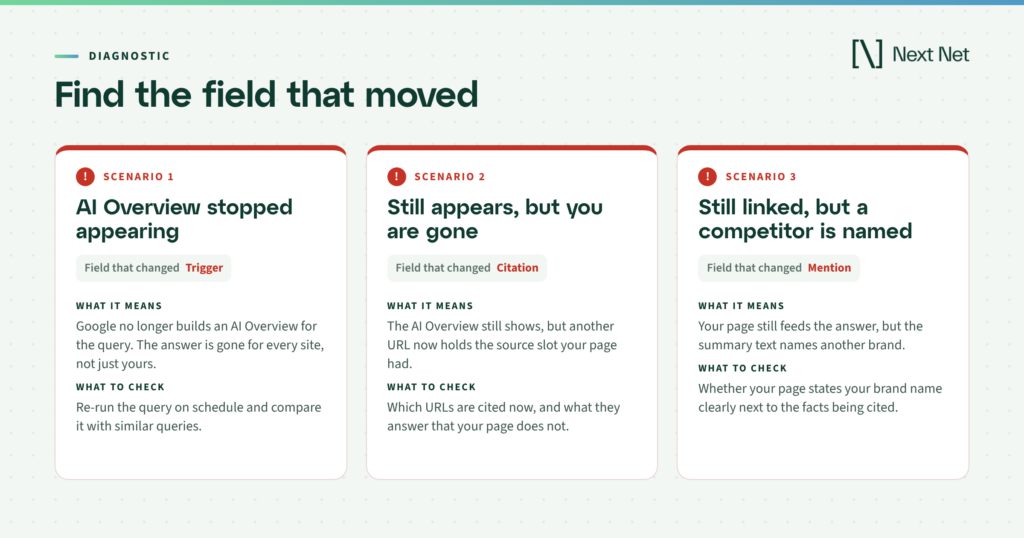
When a tracked number changes, the four fields tell you which kind of change it is, and each kind needs a different response.
The AI Overview stopped appearing. Google decided the query is better served by classic results. Your organic ranking is now the whole game for that query, so check where you rank and whether the snippet still earns the click.
The AI Overview still appears, but you’re gone. Check eligibility first. Google’s AI features guide says a page has to be indexed and eligible to show with a snippet to be linked in an AI Overview, so a stray nosnippet tag, a noindex, or a crawl block can remove you. Then confirm nobody switched on the new Search Console setting that excludes a site from Google’s generative AI features. Google says sites that opt out receive no traffic or impressions from those features.
You’re still linked, but a competitor is now named. This is a positioning problem. Look at the page Google is drawing from and compare it with the competitor’s. The answer usually turns on which page states the point plainly, with specifics, near the top.
A new domain keeps appearing across your topic. Google has found a source it trusts in your category. Read it, learn what it covers that you don’t, and treat it as a target for coverage or a reference.
What a tracked baseline makes possible
A home iBuyer brand came to our team competing city by city against larger national names, in organic search and in AI answers. The program paired a technical audit focused on structured data and machine-readable content with tighter landing and location page copy, long-form posts built around buyers’ questions, and links from trusted news publications.
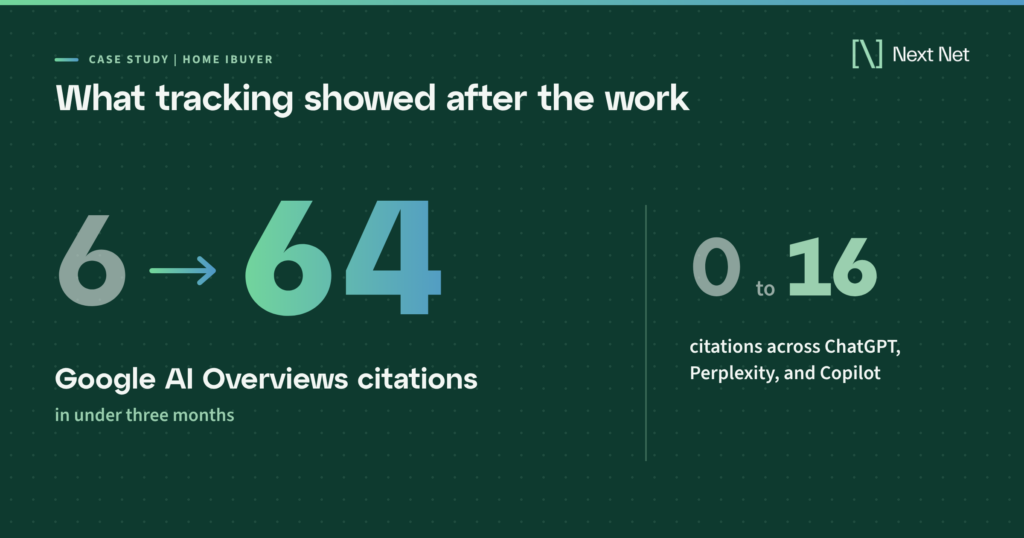
In under three months, the brand’s citations in Google AI Overviews grew from 6 to 64. Its citations across ChatGPT, Perplexity, and Copilot went from zero to 16, and its top-ten keyword rankings rose 64%.
The figures only mean something because the starting point was written down. A recorded baseline on a fixed set of queries is what turns “we’re showing up more in AI Overviews” into a result you can put in front of leadership.
What to look for in an AI Overviews tracker
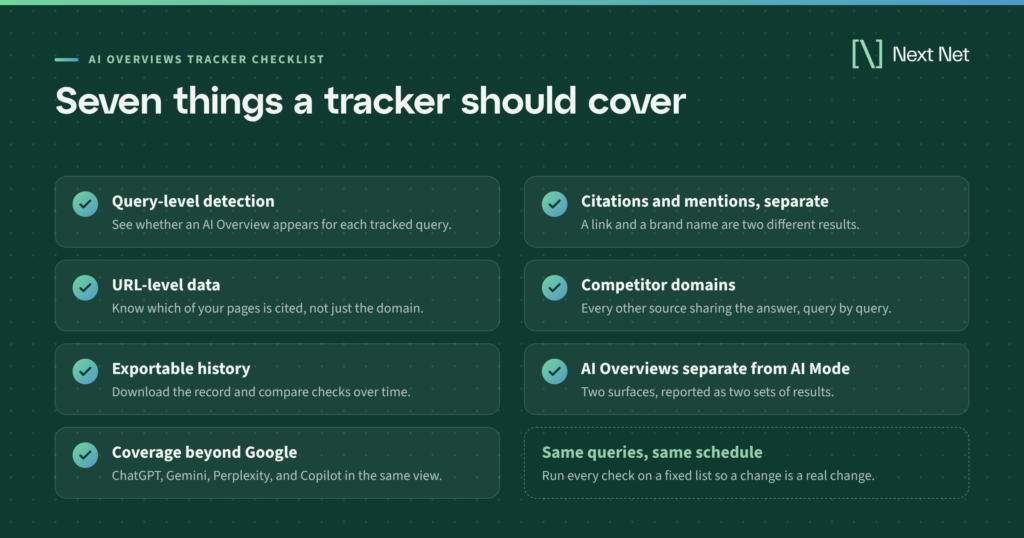
Once your manual sheet passes 50 queries, or once you want weekly checks across several locations, it’s time for a tool. Use the four fields as your checklist, then add the practical requirements.
- Query-level AI Overview detection. It should tell you, per query, whether an AI Overview appeared on each check.
- Citations and mentions as separate fields. A tool that blends links and brand mentions into one score hides the most useful distinction you have.
- URL-level citation data. You need to know which of your pages Google linked, beyond the fact that your domain appeared.
- Competitor and source domains. Every domain in the answer, logged over time.
- History you can export. Trend lines by topic, and raw data you can pull into your own reporting.
- AI Overviews separated from AI Mode. Search Console combines them, so your tracker shouldn’t.
- Coverage beyond Google. Your buyers also ask ChatGPT, Gemini, Perplexity, and Copilot. A tracker that covers only Google AI Overviews gives you one column of a five-column table.
Where NextNet AI fits
NextNet AI tracks your visibility across ChatGPT, Gemini, Perplexity, Copilot, and Google AI Overviews on a tracked set of topics, with citation history by engine and by topic, competitor benchmarking, and sentiment scored per engine. Its Drift Index flags when your content is starting to move away from what the engines now expect, before your visibility drops. The features page shows each view, and the platform walkthrough runs through the workflow end to end.
If you want the tracking and the work behind it, AI Discover is the fulfillment side: the content, technical, and reference-building program that produced the iBuyer results above.
Frequently asked questions
What is an AI Overviews tracker?
An AI Overviews tracker is a tool or process that checks a fixed set of Google queries on a schedule and records whether an AI Overview appeared, whether your pages were linked in it, whether your brand was named, and which other domains were cited. It turns individual searches into trend lines you can act on.
Can I see AI Overviews data in Google Search Console?
Yes. The generative AI performance report, available to all sites since August 31, 2026, shows impressions of your links in AI Overviews and AI Mode by page, country, device, and date. It doesn’t show clicks, queries, or position, and it combines AI Overviews with AI Mode, so you’ll need your own tracking for those details.
How often should I track AI Overviews?
Weekly for your most important topics and every two weeks for the rest is a sensible starting cadence. The bigger rule is consistency: same queries, same location, same device, same method on every check, so changes in the data reflect changes in Google rather than changes in how you looked.
Why does Search Console show position 1 for a page that ranks lower?
An AI Overview occupies a single position, and every link inside it gets that position. Search Console records the topmost position any of your links held for a query, so a page linked in an AI Overview at the top of the page can show position 1 even when its organic listing sits lower.
Do AI Overviews reduce clicks to websites?
On average, yes. Pew Research Center found that people who saw an AI summary clicked a traditional search result on 8% of visits, compared with 15% when no summary appeared. That’s why AI Overviews tracking matters: when fewer people click, being cited and named in the answer carries more of the weight.
Start with the queries, then add the tool
Google gave site owners a real number for AI Overviews this year, and it’s worth opening today. It just answers a narrower question than the one your team is asking. To know whether AI Overviews are working for you, track the trigger, the citation, the mention, and the company on a fixed set of queries, on a fixed schedule, and line it up against your traffic.
Build the list this week, run the first check, and write down the baseline. Then, when you’re ready to see the same numbers across every engine your buyers use, request a NextNet AI report card and we’ll show you where you stand.