
Schema Markup for AI Search: The Types That Matter and the Ones You Can Skip

Somebody on your team has asked the question by now. “What schema do we need to add so ChatGPT picks us up?” It’s a fair question. It also has an answer most people don’t want to hear, and it comes from Google itself: there is no special markup that gets a page into an AI answer.
That doesn’t make schema markup pointless. It makes the usual advice about it wrong in a specific way. Most guides treat schema as a checklist, where more types means more visibility. AI engines don’t work like that, and neither does the search index that feeds Google AI Overviews in the first place.
This post sorts the schema.org vocabulary into two piles. The first is the short list of types that describe entities AI systems care about: who you are, who wrote this, what you sell, and where you operate. The second is everything that used to earn a rich result and no longer does, plus the invented “AI schema” that never did anything at all. You’ll also get working JSON-LD examples for the types worth keeping, and a way to check whether any of it is changing how often your brand shows up across ChatGPT, Gemini, Perplexity, Copilot, and Google AI Overviews.
Schema markup is structured data, written in the shared schema.org vocabulary and usually added to a page as JSON-LD, that labels what a page contains and how its parts relate: this is an article, written by this person, published by this organization, about this product, sold at this price. Search engines and AI systems read those labels to reduce ambiguity about entities and their attributes. Schema does not rank a page, and it does not make a page eligible for AI answers on its own.
What schema does for an AI engine, and what it can’t do
Start with how AI search retrieves content, because that explains why schema plays a supporting role rather than a starring one.
Google’s guide to optimizing for generative AI features on Google Search describes AI Overviews and AI Mode as grounded in the core Search index. The model runs retrieval-augmented generation, pulling pages that already rank, and it fans a single question out into several related queries to gather more sources. A page has to be indexed, eligible for a snippet, and good enough to be retrieved before any of its markup gets read.
Once a page is retrieved, structured data helps a system resolve what it’s looking at. Google’s introduction to structured data explains that it uses markup both to understand individual pages and to build a broader picture of the people, organizations, and products those pages describe. Bing has said the same thing in its webmaster documentation: structured data is one of the clues it uses to understand page content, and Bing’s index sits underneath Copilot.
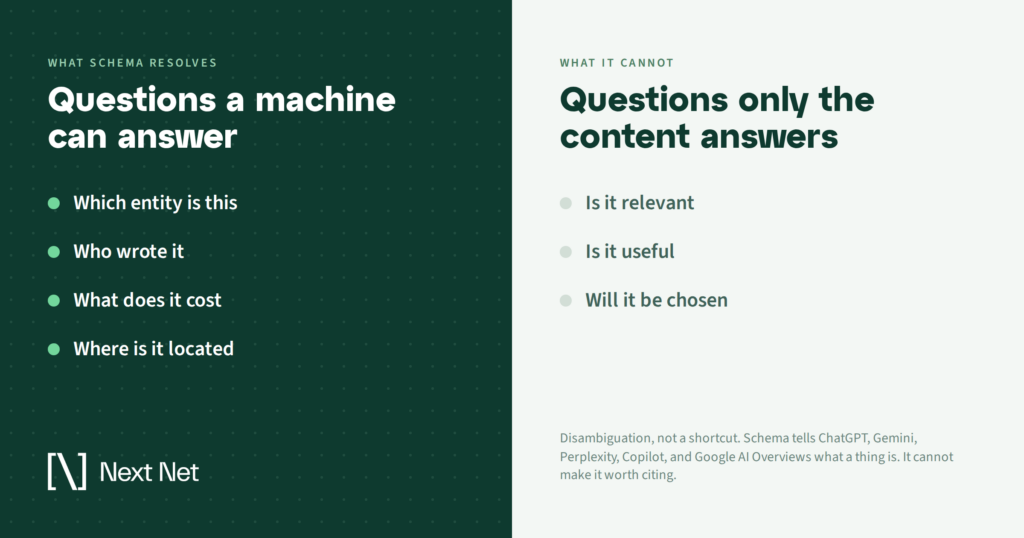
So the honest job description for schema in AI search is disambiguation. It tells a retrieval system that the “Acme” on this page is Acme Plumbing in Austin, not Acme Software in Dublin. It connects an author name to a profile. It separates the price from the model number. Those are useful things. They are also small things.
Here’s the part that matters for your budget. Schema tells engines what a page is; it cannot tell them why the page deserves the answer.
A page with flawless markup and commodity content is still scenery to an AI engine: present in the index, never pulled into the response. The retrieval step is hunting for the most specific, most useful source it can find. Markup can’t manufacture that.
What Google says about schema and AI search
It’s worth reading Google’s position directly, because it’s clearer than most of the commentary written about it.
The generative AI guide includes a section on myths, and structured data is on the list. Google states that structured data isn’t required for its generative AI features, that there’s no special schema.org markup to add, and that site owners should keep using it as part of normal SEO because it supports eligibility for rich results. The same section dismisses llms.txt files and other “AI markup” as things Google Search doesn’t read at all.
Two rules from Google’s general structured data guidance carry over to AI search without modification. First, markup has to describe content that’s visible on the page. Google says not to add structured data about information users can’t see, even when it’s accurate. Second, fewer complete and correct properties beat a long list of half-filled ones. Both rules exist because the markup is meant to label real content, not stand in for it.
The pattern of deprecations tells you the rest. Google’s Search Central documentation changelog records How-to rich results being removed in September 2023, seven more types retired in mid-2025 (book actions, course info, estimated salary, ClaimReview, learning video, special announcement, and vehicle listing), and FAQ rich results ending on May 7, 2026, with the documentation deleted that June. Over the same period, Google kept adding properties for merchant listings, return policies, loyalty programs, discussion forums, and Q&A pages, and added a review snippet guideline about fake and undisclosed incentivized reviews.
Read that as a signal. The types Google keeps investing in describe real-world entities and transactions. The types it retires are presentational. That’s the shape of the list below.
The schema types that matter for AI search
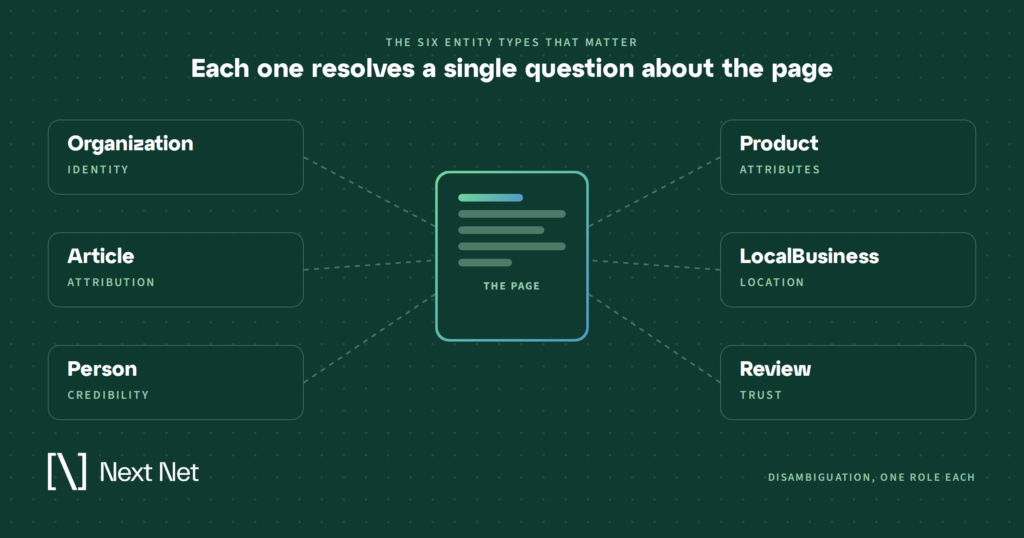
These are the types that describe something an answer engine has to get right before it can name you, quote you, or recommend you. None of them is a shortcut. All of them reduce the chance that a system confuses you with someone else or leaves out a detail you’d want in the answer.
Organization: the entity home
This is the one to fix first. An Organization block on your homepage or about page gives every engine a canonical record of who you are: name, legal name, logo, URL, contact points, and, most importantly, sameAs links to the profiles that corroborate you elsewhere. Google’s documentation calls out sameAs specifically as a property it makes general use of.
For AI search, this is entity resolution. When Gemini or Perplexity decides whether the brand mentioned in three different sources is the same brand, consistent identifiers across your site and your profiles are what make that match clean.
Article and BlogPosting: attribution and recency
Every piece of editorial content should carry Article (or BlogPosting) markup with a headline, an author that resolves to a Person, a publisher, and both datePublished and dateModified with time zone. Answer engines lean on recency when they choose between similar sources, and they lean on attribution when they decide whether a source is credible enough to cite.
Keep dateModified honest. Google’s helpful content guidance already warns against changing dates without changing content, and an AI system that pulls a “fresh” page and finds nothing new has learned something about your site.
Person and ProfilePage: the author entity
Google added ProfilePage documentation in late 2023, and it pairs with Person markup on author bios. Together they turn a byline into an entity with a name, a role, credentials, and sameAs links to that person’s professional profiles.
This matters more in AI search than it did in blue-link search. When a system is deciding whose first-hand account to trust on a topic, a byline that resolves to a real, consistent person is a stronger signal than a byline that resolves to nothing.
Product and Offer: what AI shopping answers extract
Google’s generative AI guide says plainly that AI responses can include product listings and product information, and it points merchants to Merchant Center feeds alongside on-page markup. Product with a nested Offer gives you the on-page half of that: name, brand, SKU, price, availability, and aggregate rating, in a form an engine can read without parsing your template.
This is the type where markup does the most literal work. Shopping answers pull attributes, not paragraphs. If your price and availability live only in rendered HTML, you’re asking the engine to guess.
LocalBusiness: where you operate
For anyone with a service area or a storefront, LocalBusiness (or the relevant subtype) with address, geo, opening hours, and service area is the on-site counterpart to your Google Business Profile. Google’s AI guide names local business details as something generative responses can surface, and it treats Business Profile as the primary feed. The markup reinforces that record and keeps the two from disagreeing.
Review and AggregateRating: only where the reviews are real
Ratings are one of the attributes an answer engine will happily quote. Use AggregateRating where you have visible, real reviews on the page. Google’s guidelines have long restricted self-serving reviews on LocalBusiness and Organization pages, and the July 2026 addition to the review snippet guidelines covers fake and undisclosed incentivized reviews. Marking up ratings you can’t stand behind is a fast way to get all of your structured data ignored.
BreadcrumbList and VideoObject: cheap structure
BreadcrumbList costs almost nothing and gives engines a clean picture of where a page sits in your site. VideoObject matters where you host video, since Google’s guide says generative features can bring in relevant images and video alongside links. Neither is a priority on its own, but both are worth having once the entity types above are in place.
The schema types you can skip
Some of these are types Google has retired. Some never existed in any standard. All of them are places where teams spend developer hours that should go somewhere else.
FAQPage
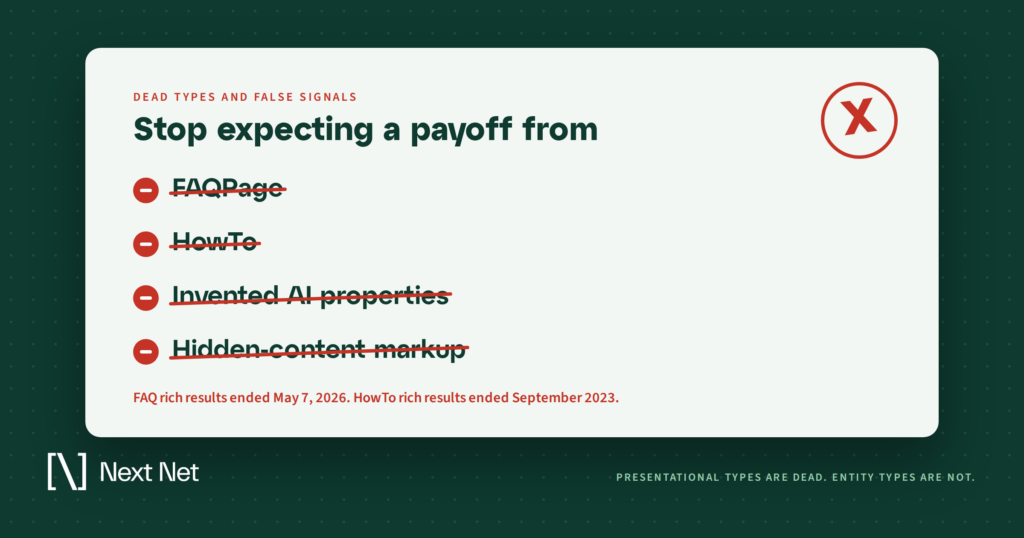
FAQ rich results stopped appearing in Google Search on May 7, 2026, and Google removed the documentation on June 15. The type had been restricted to government and health sites since Google’s August 2023 change, so for most sites the feature had been gone for nearly three years before it was gone officially.
The markup itself is still valid schema.org, and Google has said repeatedly that unused structured data doesn’t hurt. Leave it in place if it accurately describes visible questions and answers. Don’t add it in the hope that an answer engine will treat it as a shortcut. The engines read the visible Q&A either way, and that’s where your effort belongs.
HowTo
Deprecated across mobile and desktop in September 2023. If it’s still in your templates, nobody is reading it. Write the steps as clear headings and numbered text instead, which is what an engine extracts.
The mid-2025 retirements
Book actions, course info, estimated salary, ClaimReview, learning video, special announcement, and vehicle listing were all pulled from Google Search results in 2025 (Google later kept book actions after finding a feature still used it). If one of these was doing work for you in another engine, keep it. Otherwise, it’s maintenance without a payoff.
Invented “AI” types and properties
There is no AIContent type, no aiSummary property, no citation-boosting vocabulary. Anything you see sold as AI-specific schema is either a normal schema.org type with a new label or a property no engine has documented reading. Google’s myths section puts llms.txt files in the same category: fine to maintain for other systems if you want, ignored by Google Search.
Markup for content people can’t see
Hidden FAQ blocks, invisible review counts, product attributes that aren’t on the page: this is the one category that can do damage, because it violates the visible-content rule and invites a manual action. It’s also pointless for AI search, since the engines are reading the rendered page and comparing it to what the markup claims.
The kitchen-sink @graph
Some plugins emit a dozen nested types on every URL: WebSite, WebPage, ImageObject, BreadcrumbList, Person, Organization, Article, and more, all wired together. It validates, but Google’s guidance favors fewer complete properties over a long list of thin ones. Audit what the plugin emits and turn off the types that aren’t describing anything real on that page.
Schema markup examples worth copying
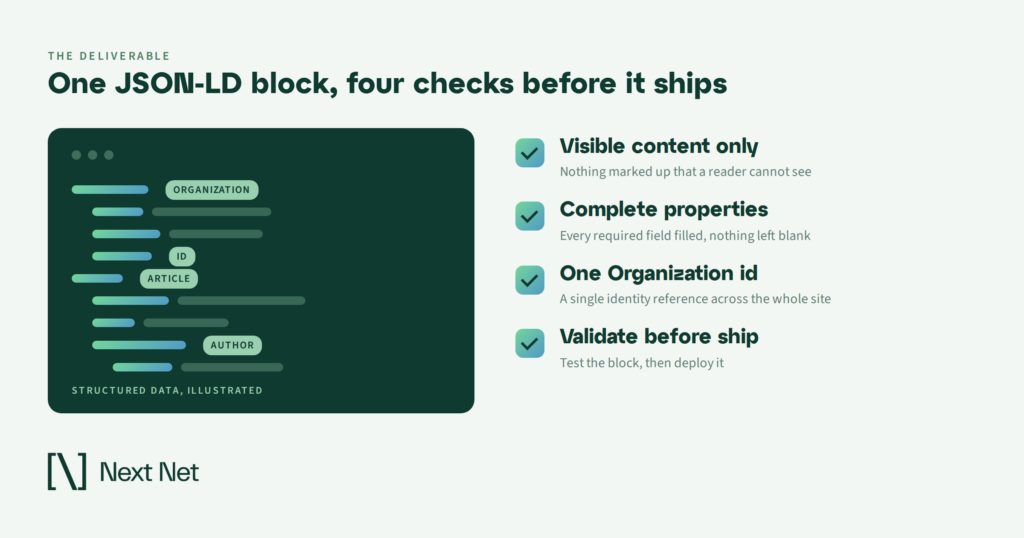
These three blocks cover most sites. Each one is JSON-LD, which Google recommends because it sits in a script tag and doesn’t have to be woven through your HTML. Replace the placeholder values, keep every property honest, and validate before you ship.
Organization with sameAs
<script type=”application/ld+json”>
{
“@context”: “https://schema.org”,
“@type”: “Organization”,
“@id”: “https://www.example.com/#organization”,
“name”: “Example Co”,
“legalName”: “Example Company LLC”,
“url”: “https://www.example.com/”,
“logo”: “https://www.example.com/assets/logo.png”,
“sameAs”: [
“https://www.linkedin.com/company/example-co”,
“https://www.youtube.com/@exampleco”,
“https://www.wikidata.org/wiki/Q000000”
],
“contactPoint”: {
“@type”: “ContactPoint”,
“contactType”: “customer service”,
“email”: “hello@example.com”
}
}
</script>
Put this on the homepage and reference the @id from Article and Product blocks elsewhere on the site, so every page points back to the same entity.
Article with a resolvable author
<script type=”application/ld+json”>
{
“@context”: “https://schema.org”,
“@type”: “Article”,
“headline”: “Schema Markup for AI Search”,
“datePublished”: “2026-10-12T09:00:00-04:00”,
“dateModified”: “2026-10-12T09:00:00-04:00”,
“author”: {
“@type”: “Person”,
“name”: “Jordan Lee”,
“url”: “https://www.example.com/authors/jordan-lee/”,
“sameAs”: [“https://www.linkedin.com/in/jordanlee”]
},
“publisher”: { “@id”: “https://www.example.com/#organization” },
“image”: “https://www.example.com/images/schema-hero.png”
}
</script>
The author URL should resolve to a real profile page carrying Person and ProfilePage markup. That’s the link that turns a name into an entity.
Product with Offer
<script type=”application/ld+json”>
{
“@context”: “https://schema.org”,
“@type”: “Product”,
“name”: “Example Pro Router”,
“sku”: “EX-RTR-200”,
“brand”: { “@type”: “Brand”, “name”: “Example Co” },
“image”: “https://www.example.com/products/ex-rtr-200.png”,
“offers”: {
“@type”: “Offer”,
“url”: “https://www.example.com/products/ex-rtr-200/”,
“priceCurrency”: “USD”,
“price”: “149.00”,
“availability”: “https://schema.org/InStock”
}
}
</script>
Add AggregateRating only if the page shows real reviews. If you sell through Merchant Center, make sure the feed and the markup agree on price and availability, since the feed takes precedence for anything you submit there.
How to tell whether your schema is doing anything
Google gives you two measurement tools and one report. The Rich Results Test confirms your markup parses and is eligible for the features Google still shows. The rich result reports in Search Console track those features over time. And the Generative AI performance report in Search Console, which Google’s guide points to, shows how your pages perform inside AI Overviews and AI Mode specifically.
That covers Google. It doesn’t cover ChatGPT, Gemini, Perplexity, or Copilot, and none of those engines publishes a webmaster report. Measuring schema’s effect there means measuring citations directly: how often your domain is cited for the prompts your buyers ask, which pages get pulled, and whether that footprint moves after you change something. That’s what the NextNet platform tracks across all five engines, and it’s the only way to attribute a markup change to an outcome outside Google. Our post on reading your AI citation footprint walks through what that measurement looks like in practice.
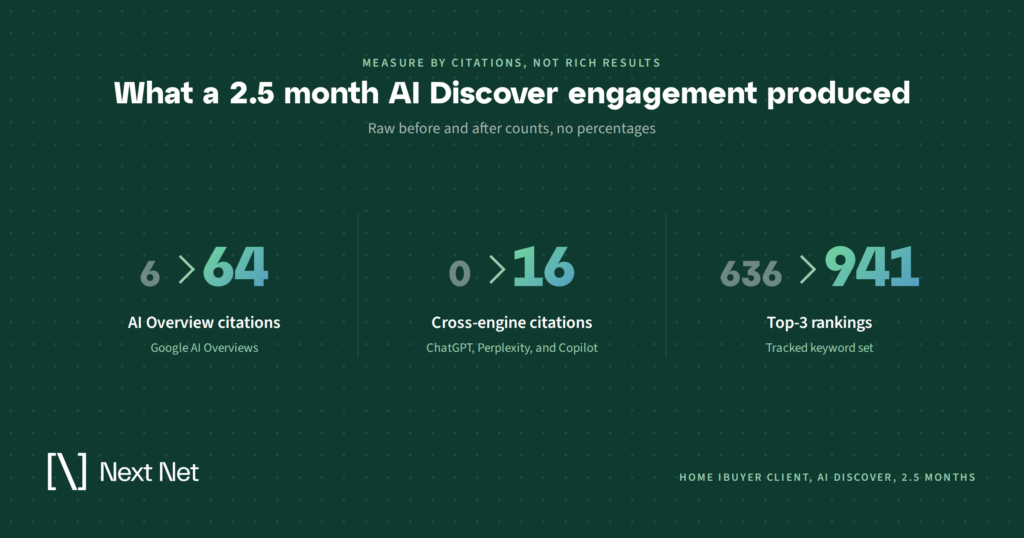
One caution about attribution. Schema is almost never the only thing that changed. A home iBuyer client we work with through AI Discover came in with thin AI visibility and steep competition in a handful of US cities. The engagement started with a technical audit that fixed site speed, crawl errors, and structured data, and then layered on more than 50 authoritative backlinks, four long-form blog posts, and syndicated editorial articles. After about two and a half months, the brand’s Google AI Overview citations grew from 6 to 64, it went from zero to 16 citations across ChatGPT, Perplexity, and Copilot, and its top-3 keyword rankings rose from 636 to 941.
Schema was part of that result. It was not the cause of it. The audit made the site legible; the content and links made it worth citing. If you’re measuring, measure the whole program, and treat markup as the plumbing that lets the rest of it flow.
A practical order of operations
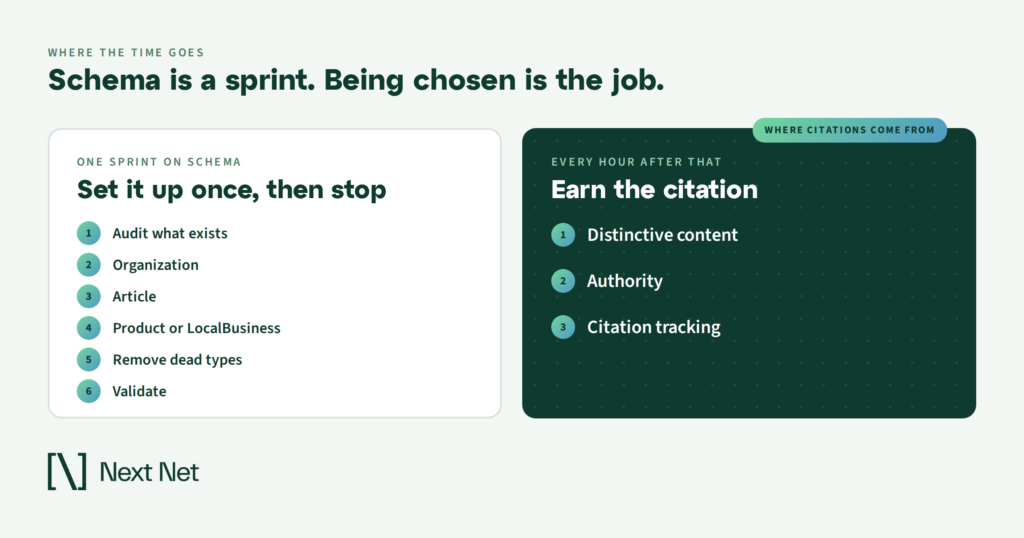
If you have a developer for one sprint, this is the sequence that pays off.
- Audit what’s already there. Run your key templates through the Rich Results Test and read the raw output. Most sites discover a plugin is emitting types they never chose.
- Fix Organization first. One block, one @id, complete sameAs. Every other type references it.
- Put Article on every editorial page with a real author, a real profile page, and honest dates.
- Add Product or LocalBusiness depending on what you are, and make sure the values match what’s visible and what’s in any feed.
- Remove what’s dead. HowTo, orphaned FAQPage on pages with no visible FAQ, invented properties, and anything describing hidden content.
- Validate, then watch citations. Confirm it parses, then track your footprint across ChatGPT, Gemini, Perplexity, Copilot, and Google AI Overviews for six to eight weeks before you draw conclusions.
Then go back to the content. Every hour past that first sprint returns more when it’s spent on a page that says something no competitor has said. A brand with perfect markup and nothing distinctive to say stays scenery. A brand with a real point of view gets named, with or without a flawless @graph.
Frequently asked questions
Does schema markup help with ChatGPT and Perplexity?
Only indirectly. Neither engine has published guidance saying it reads schema.org markup, and Google has said explicitly that no special markup is required for its own AI features. What schema does is make your entities and attributes unambiguous in the pages those engines retrieve. If the content isn’t worth citing, markup won’t change that.
Should I remove FAQ schema now that Google dropped FAQ rich results?
Not unless it describes content that isn’t on the page. Google has said unused structured data doesn’t cause problems, and FAQPage remains valid schema.org vocabulary that other systems may parse. Keep it where it’s accurate, stop adding it for the rich result, and put the effort into the visible questions and answers.
Is JSON-LD better than microdata for AI search?
Google treats all three supported formats the same as long as the markup is valid, but recommends JSON-LD because it’s easiest to implement and maintain. For AI search there’s no difference in how the data is read. Pick JSON-LD for the maintenance benefit.
Do I need an llms.txt file in addition to schema?
Not for Google Search, which says it ignores llms.txt entirely. Some other systems read the file, so maintaining one is harmless if you want to. It is not a substitute for structured data, and neither one is a substitute for content an engine wants to cite.
How long before schema changes show up in AI answers?
Expect weeks, not days. Google has to recrawl and reprocess the pages, and the other engines refresh on their own schedules. Give a change six to eight weeks of citation tracking before you decide whether it moved anything, and change one thing at a time if you want clean attribution.
Where schema fits in an AI visibility program
Schema markup is the least glamorous part of AI search and one of the easiest to get right. Six entity types, honest values, one sprint. After that, the question stops being “what markup do we need” and becomes “which prompts are we cited for, and which are we missing.” That second question is where the real work is, and where the NextNet platform is built to help.
If you want to see how your brand shows up today across ChatGPT, Gemini, Perplexity, Copilot, and Google AI Overviews, start with an AI visibility report card and take it from there.